QNN LPAI Integration
This section is intended for developers building applications using the QNN Common API and targeting the LPAI backend Successful integration requires a comprehensive understanding of both QNN and LPAI subsystems, particularly in the areas of memory management and data structure interoperability.
The LPAI backend introduces specific constraints and requirements that differ from other QNN backends. Developers must be familiar with:
Memory Allocation Strategies: LPAI imposes strict limitations on memory usage, necessitating precise control over buffer allocation, alignment, and lifecycle.
Understanding how QNN interacts with LPAI’s memory model is critical for avoiding runtime errors, crashes and optimizing performance.
LPAI-Specific Data Structures and Enumerations: The LPAI API defines a set of custom data types, enumerations, and configuration parameters that must be correctly instantiated and passed to QNN interfaces.
These include tensor descriptors, execution contexts, and backend-specific metadata.
For detailed guidance, refer to the following sections:
QNN LPAI Memory Allocations
Sample App Tutorial
Proper integration ensures compatibility, stability, and optimal performance of your application when deployed on LPAI-enabled hardware.
QNN LPAI Memory Management
This document describes how the QNN Low-Power AI (LPAI) runtime uses and manages memory. The runtime relies on user-allocated buffers that must obey backend-provided alignment constraints. Incorrect alignment or insufficient memory will cause initialization or execution failures.
Overview of Memory Types
The LPAI runtime uses three distinct memory pools, each required for correct graph execution:
Each type has unique allocation rules, lifetime characteristics, and backend alignment requirements.
Scratch Memory: temporary and overwriteable tensors.
Persistent Memory: long-lived tensors such as RNN state.
IO Memory: input/output tensors; may be user-provided or automatically placed into scratch memory.
All memory pools must be correctly aligned according to backend requirements.
Get Memory Alignment Requirements
Before allocating any memory, clients must retrieve backend alignment constraints. These constraints apply to:
Scratch memory
Persistent memory
User-provided IO buffers
To query backend alignment requirements:
 1QnnLpaiBackend_BufferAlignmentReq_t bufferAlignmentReq;
 2
 3QnnLpaiBackend_CustomProperty_t customBackendProp;
 4customBackendProp.option   = QNN_LPAI_BACKEND_GET_PROP_ALIGNMENT_REQ;
 5customBackendProp.property = &bufferAlignmentReq;
 6
 7QnnBackend_Property_t backendProp;
 8backendProp.option         = QNN_BACKEND_PROPERTY_OPTION_CUSTOM;
 9backendProp.customProperty = &customBackendProp;
10
11QnnBackend_Property_t *backendPropPtrs[2] = {0};
12backendPropPtrs[0] = &backendProp;
13
14QnnBackend_getProperty(backendHandle, backendPropPtrs);
15
16if (!error) {
17  *startAddrAlignment = bufferAlignmentReq.startAddrAlignment;
18  *sizeAlignment      = bufferAlignmentReq.sizeAlignment;
19}
Scratch Memory
Scratch memory holds temporary intermediate results that the runtime can overwrite and reuse during execution.
Key Properties
Used for intermediate tensors across graph execution.
Fully memory-planned offline by the backend.
Size must be queried from the graph.
Must be provided before
QnnGraph_finalize().May be replaced at runtime but must always exist.
Querying Scratch Memory Requirements
QnnLpaiGraph_CustomProperty_t customGraphProp;
customGraphProp.option   = QNN_LPAI_GRAPH_GET_PROP_SCRATCH_MEM_SIZE;
customGraphProp.property = scratchSize;

QnnGraph_Property_t graphProp;
graphProp.option         = QNN_GRAPH_PROPERTY_OPTION_CUSTOM;
graphProp.customProperty = &customGraphProp;

QnnGraph_Property_t *graphPropPtrs[2] = {0};
graphPropPtrs[0] = &graphProp;

QnnGraph_getProperty(graphHandle, graphPropPtrs);
Allocating and Configuring Scratch Memory
QnnLpaiGraph_Mem_t lpaiGraphMem;
lpaiGraphMem.memType = memType;
lpaiGraphMem.size    = scratchSize;
lpaiGraphMem.addr    = scratchBuffer;

QnnLpaiGraph_CustomConfig_t customGraphCfg;
customGraphCfg.option = QNN_LPAI_GRAPH_SET_CFG_SCRATCH_MEM;
customGraphCfg.config = &lpaiGraphMem;

QnnGraph_Config_t graphConfig;
graphConfig.option       = QNN_GRAPH_CONFIG_OPTION_CUSTOM;
graphConfig.customConfig = &customGraphCfg;

QnnGraph_Config_t *graphCfgPtrs[2] = {0};
graphCfgPtrs[0] = &graphConfig;

QnnGraph_setConfig(graphHandle, (const QnnGraph_Config_t **)graphCfgPtrs);
Persistent Memory
Persistent memory stores intermediate tensors that cannot be overwritten, because they must persist across operations. Examples include RNN state tensors.
Key Properties
Holds long-lived intermediate data.
User must allocate memory after querying required size.
Must follow backend alignment constraints.
Must remain valid until
QnnContext_free().
Querying Persistent Memory Requirements
QnnLpaiGraph_CustomProperty_t customGraphProp;
customGraphProp.option   = QNN_LPAI_GRAPH_GET_PROP_PERSISTENT_MEM_SIZE;
customGraphProp.property = persistentSize;

QnnGraph_Property_t graphProp;
graphProp.option         = QNN_GRAPH_PROPERTY_OPTION_CUSTOM;
graphProp.customProperty = &customGraphProp;

QnnGraph_Property_t *graphPropPtrs[2] = {0};
graphPropPtrs[0] = &graphProp;

QnnGraph_getProperty(graphHandle, graphPropPtrs);
Allocating and Configuring Persistent Memory
QnnLpaiGraph_Mem_t lpaiGraphMem;
lpaiGraphMem.memType = memType;
lpaiGraphMem.size    = persistentSize;
lpaiGraphMem.addr    = persistentBuffer;

QnnLpaiGraph_CustomConfig_t customGraphCfg;
customGraphCfg.option = QNN_LPAI_GRAPH_SET_CFG_PERSISTENT_MEM;
customGraphCfg.config = &lpaiGraphMem;

QnnGraph_Config_t graphConfig;
graphConfig.option       = QNN_GRAPH_CONFIG_OPTION_CUSTOM;
graphConfig.customConfig = &customGraphCfg;

QnnGraph_Config_t *graphCfgPtrs[2] = {0};
graphCfgPtrs[0] = &graphConfig;

QnnGraph_setConfig(graphHandle, (const QnnGraph_Config_t **)graphCfgPtrs);
IO Memory
IO memory contains all graph input and output tensors.
Key Properties
Can be user-provided or mapped into scratch memory by default.
User-provided IO buffers must follow alignment requirements.
Must remain valid during graph execution.
Querying IO Memory Requirements
// QnnSystemInterface is defined in ${QNN_SDK_ROOT}/include/QNN/System/QnnSystemInterface.h
QnnSystemInterface qnnSystemInterface;

// Init qnn system interface ......
// See ${QNN_SDK_ROOT}/examples/QNN/SampleApp/SampleAppLPAI code
// Extract QNN binaryInfo
const QnnSystemContext_BinaryInfo_t* binaryInfo;
Qnn_ContextBinarySize_t binaryInfoSize;
qnnSystemInterface->systemContextGetBinaryInfo(qnnSystemCtxHandle,
                                               contextBinaryBuffer,
                                               contextBinaryBufferSize,
                                               &binaryInfo,
                                               &binaryInfoSize);
// Extract graph info from QNN binaryInfo, assume only one graph in the context
QnnSystemContext_GraphInfo_t* graphInfos = binaryInfo->contextBinaryInfoV1.graphs;
QnnSystemContext_GraphInfo_t* graphInfo  = &(graphInfos[0]);

// Extract tensor info from graphInfo
Qnn_Tensor_t* inputs     = graphInfo->graphInfoV1.graphInputs;
Qnn_Tensor_t* outputs    = graphInfo->graphInfoV1.graphOutputs;
size_t numInputs         = graphInfo->graphInfoV1.numGraphInputs;
size_t numOutputs        = graphInfo->graphInfoV1.numGraphOutputs;
Allocating and Configuring IO Memory
// Qnn_Tensor_t is defined in ${QNN_SDK_ROOT}/include/QNN/QnnTypes.h
Qnn_Tensor_t tensors[numTensors];

size_t startAddrAlignment, sizeAlignment
// Retrieve buffer start address and size alignment requirements
// See ${QNN_SDK_ROOT}/examples/QNN/SampleApp/SampleAppLPAI code

for (uint32_t i = 0; i < numTensors; i++) {
   Qnn_Tensor_t* tensor = &tensors[i];
   tensor->v1.memType   = QNN_TENSORMEMTYPE_RAW;
   int dataSize         = calculate_tensor_size(qnnTensor->v1);
   tensor->v1.clientBuf.data =
      allocate_aligned_memory(startAddrAlignment, sizeAlignment, dataSize);
   tensor->v1.clientBuf.dataSize = dataSize;
}
Memory Lifetime and Allocation Requirements
Scratch and persistent memory must be allocated and provided before
QnnGraph_finalize().Persistent memory must remain accessible for the entire lifetime of the LPAI context.
Scratch memory may be replaced dynamically but must always exist.
IO memory must remain valid throughout execution.
Recommended Workflow
Query backend alignment requirements.
Query scratch memory size.
Query persistent memory size.
Allocate aligned memory buffers.
Pass scratch and persistent memory to the graph using
QnnGraph_setConfig().Call
QnnGraph_finalize().Optionally provide user-defined IO buffers.
Execute the graph.
QNN LPAI Data Structures and Enumerations
QnnBackend_Property_t
This structure provides backend property. This data structure is defined in QnnBackend header file present at <QNN_SDK_DIR>/include/QNN/.
Parameters |
Desctiption |
|---|---|
QnnBackend_PropertyOption_t option |
Option is used by clients to set or get any backend property. |
QnnBackend_CustomProperty_t customProperty |
Pointer to the backend property requested by client. |
QnnLpaiBackend_GetPropertyOption_t
This enum contains the set of properties supported by the LPAI backend. Objects of this type are to be referenced through QnnBackend_CustomProperty_t.
This enum is defined in QnnLpaiBackend header file present at <QNN_SDK_DIR>/include/QNN/LPAI/.
Property |
Desctiption |
|---|---|
QNN_LPAI_BACKEND_GET_PROP_ALIGNMENT_REQ |
Used to get the start address alignment and size alignment requirement of buffers. Struct: QnnLpaiBackend_BufferAlignmentReq_t |
QNN_LPAI_BACKEND_GET_PROP_REQUIRE_PERSISTENT_BINARY |
Used to query if cached binary buffer needs to be
persistent until |
QNN_LPAI_BACKEND_GET_PROP_UNDEFINED |
Unused |
QnnContext_Config_t
The QnnContext_ConfigOption_t structure provides context configuration. This data structure is defined in QnnContext header file present at <QNN_SDK_DIR>/include/QNN/.
Parameters |
Desctiption |
|---|---|
QnnContext_ConfigOption_t option |
Provides option to set context configs. See QnnContext_ConfigOption_t |
uint8_t isPersistentBinary |
Used with QNN_CONTEXT_CONFIG_PERSISTENT_BINARY |
QnnContext_ConfigOption_t
This enum defines context config options. This enum has multiple options, but the following option is specific to QNN-LPAI BE.
This enum is defined in QnnContext header file present at <QNN_SDK_DIR>/include/QNN/.
Property |
Desctiption |
|---|---|
QNN_CONTEXT_CONFIG_PERSISTENT_BINARY |
Indicates that the context binary pointer is
available during |
QnnLpaiDevice_DeviceInfoExtension_t
QnnDevice_getPlatformInfo() uses this structure to list the supported device features/information.
This data structure is defined in QnnLpaiDevice header file present at <QNN_SDK_DIR>/include/QNN/LPAI/
Parameters |
Desctiption |
|---|---|
uint32_t socModel |
An enum value defined in Qnn Header that represents SoC model |
uint32_t arch |
It shows the architecture of the device |
const char* domainName |
It shows the domain name of the device |
QnnLpaiGraph_Mem_t
QnnGraph_setConfig() API used this structure to set custom configs for scratch and persistent buffer.
This data structure is defined in QnnLpaiGraph header file present at <QNN_SDK_DIR>/include/QNN/LPAI.
Parameters |
Desctiption |
|---|---|
QnnLpaiMem_MemType_t memType |
An enum value defined in enum QnnLpaiMem_MemType_t to memory type of buffer. |
uint32_t size |
Size of buffer |
void* addr |
Pointer to buffer |
QnnLpaiMem_MemType_t
This enum contains memory type supported by LPAI backend.
This enum is defined in QnnLpaiMem header file present at <QNN_SDK_DIR>/include/QNN/LPAI.
Property |
Desctiption |
|---|---|
QNN_LPAI_MEM_TYPE_DDR |
Main memory, only available in non-island mode |
QNN_LPAI_MEM_TYPE_LLC |
Last level cache |
QNN_LPAI_MEM_TYPE_TCM |
Tightly coupled memory for hardware |
QNN_LPAI_MEM_TYPE_UNDEFINED |
Unused |
QnnGraph_Config_t
This structure provides graph configuration.
This data structure is declared in QnnLpaiGraph header file present at <QNN_SDK_DIR>/include/QNN/.
Parameters |
Desctiption |
|---|---|
QnnGraph_ConfigOption_t option |
An enum value defined in |
QnnGraph_CustomConfig_t customConfig |
Pointer to custom graph configs |
QnnLpaiGraph_CustomConfig_t
This structure is used by QnnGraph_setConfig() to set backend specific configurations before finalizing the graph.
This data structure is declared in QnnLpaiGraph header file present at <QNN_SDK_DIR>/include/QNN/LPAI/.
Parameters |
Desctiption |
|---|---|
uint32_t option |
An enum value defined in QnnLpaiGraph_SetConfigOption_t set backend specific configs to graph |
QnnLpaiGraph_SetConfigOption_t
This enum contains custom configs for LPAI backend graph.
This enum is defined in QnnLpaiGraph header file present at <QNN_SDK_DIR>/include/QNN/LPAI.
Property |
Desctiption |
|---|---|
QNN_LPAI_GRAPH_SET_CFG_SCRATCH_MEM |
Used to set scratch memory configs. Struct: QnnLpaiGraph_Mem_t |
QNN_LPAI_GRAPH_SET_CFG_PERSISTENT_MEM |
Used to set persistent memory configs. Struct: QnnLpaiGraph_Mem_t |
QNN_LPAI_GRAPH_SET_CFG_PERF_CFG |
Used to set custom client perf configs. Struct: QnnLpaiGraph_PerfCfg_t |
QNN_LPAI_GRAPH_SET_CFG_CORE_AFFINITY |
Used to set core affinity configs. Struct: QnnLpaiGraph_CoreAffinity_t |
QNN_LPAI_GRAPH_SET_CFG_UNDEFINED |
Unused |
QnnLpaiBackend_BufferAlignmentReq_t
This structure contains parameters needed to align the start address of buffer and size of buffer.
This data structure is declared in QnnLpaiBackend header file present at <QNN_SDK_DIR>/include/QNN/LPAI/.
Parameters |
Desctiption |
|---|---|
uint32_t startAddrAlignment |
Represents start address alignment of buffer. The start address of the buffer must be startAddrAlignment-byte aligned |
uint32_t sizeAlignment |
Represents buffer size alignment. The allocated buffer must be a multiple of sizeAlignment bytes |
QnnLpaiGraph_CustomProperty_t
This structure is used by QnnGraph_getProperty() API to get backend specific configurations.
This data structure is defined in QnnLpaiGraph header file present at <QNN_SDK_DIR>/include/QNN/LPAI/.
Parameters |
Desctiption |
|---|---|
uint32_t option |
An enum value defined in enum QnnLpaiGraph_GetPropertyOption_t to retrieve backend specific property. |
void* property |
Pointer to custom property |
QnnLpaiGraph_GetPropertyOption_t
This enum contains the set of properties supported by the LPAI backend. Objects of this type are to be referenced through QnnLpaiGraph_CustomProperty_t.
This enum is defined in QnnLpaiGraph header file present at <QNN_SDK_DIR>/include/QNN/LPAI/.
Property |
Desctiption |
|---|---|
QNN_LPAI_GRAPH_GET_PROP_SCRATCH_MEM_SIZE |
Get the size requirement of scratch memory |
QNN_LPAI_GRAPH_GET_PROP_PERSISTENT_MEM_SIZE |
Get the size requirement of persistent memory |
QNN_LPAI_GRAPH_GET_PROP_UNDEFINED |
Unused |
QnnLpaiGraph_CoreAffinity_t
This structure is used by QnnGraph_getProperty() to get backend specific configurations.
This data structure is defined in QnnLpaiGraph header file present at <QNN_SDK_DIR>/include/QNN/LPAI/.
Parameters |
Desctiption |
|---|---|
QnnLpaiGraph_CoreAffinityType_t affinity |
Used to set the affinity of selected eNPU core QnnLpaiGraph_CoreAffinityType_t |
uint32_t coreSelection |
Pointer to custom property |
QnnLpaiGraph_CoreAffinityType_t
This enum contains the possible set of affinities supported by eNPU HW.
This enum is defined in QnnLpaiGraph header file present at <QNN_SDK_DIR>/include/QNN/LPAI/.
Property |
Desctiption |
|---|---|
QNN_LPAI_GRAPH_CORE_AFFINITY_SOFT |
Used to set affinity to soft. Struct: QnnLpaiGraph_CoreAffinity_t. |
QNN_LPAI_GRAPH_CORE_AFFINITY_HARD |
Used to set affinity to hard Struct: QnnLpaiGraph_CoreAffinity_t. |
QNN_LPAI_GRAPH_CORE_AFFINITY_UNDEFINED |
Unused |
QnnLpaiGraph_PerfCfg_t
This structure is used to set Client’s performance requirement for eNPU Usage. User can configure it before finalizing the graph.
This data structure is declared in QnnLpaiGraph header file present at <QNN_SDK_DIR>/include/QNN/LPAI/.
Parameters |
Desctiption |
|---|---|
uint32_t fps |
Used to set frame per second (fps) |
uint32_t ftrtRatio |
Used to set FTRT ratio |
QnnLpaiGraph_ClientPerfType_t clientType |
Used to set client type (Real time or Non-real time) enum: QnnLpaiGraph_ClientPerfType_t |
QnnLpaiGraph_ClientPerfType_t
This enum contains the type of client which can be configured by user before finalizing the graph.
This data structure is declared in QnnLpaiGraph header file present at <QNN_SDK_DIR>/include/QNN/LPAI/.
Property |
Desctiption |
|---|---|
QNN_LPAI_GRAPH_CLIENT_PERF_TYPE_REAL_TIME |
Used to set client as REAL TIME. Struct: QnnLpaiGraph_PerfCfg_t. |
QNN_LPAI_GRAPH_CLIENT_PERF_TYPE_NON_REAL_TIME |
Used to set client as NON-REAL TIME Struct: QnnLpaiGraph_PerfCfg_t. |
QNN_LPAI_GRAPH_CLIENT_PERF_TYPE__UNDEFINED |
Unused |
QNN API Call Flow
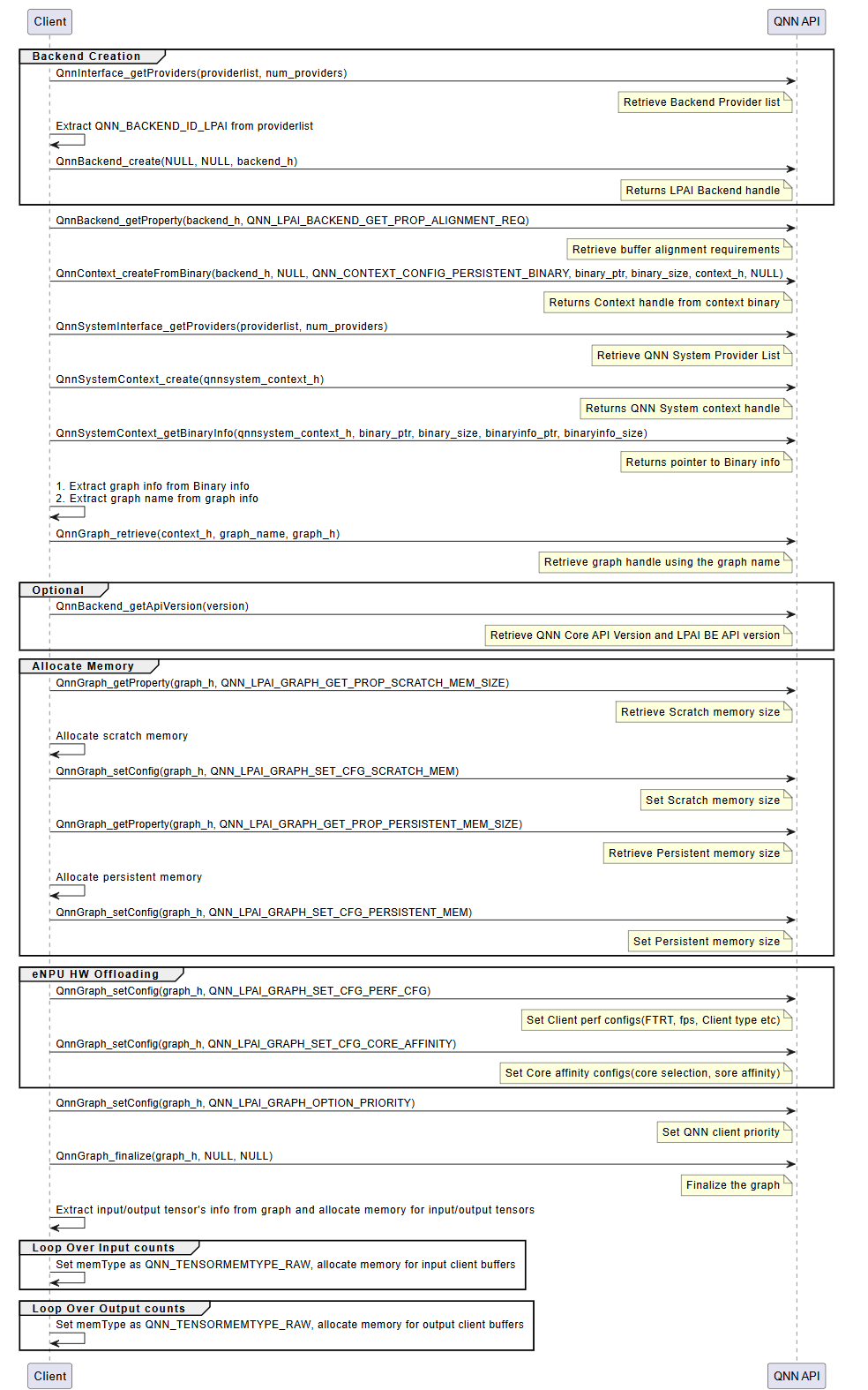
The integration of a QNN model using the LPAI backend follows a structured three-phase process. Each phase is critical to ensuring the model is correctly initialized, executed, and deinitialized within the QNN runtime environment.
Initialization
The initialization phase prepares the QNN runtime and the LPAI backend for model execution. This phase ensures that all required interfaces, memory resources, and configurations are correctly established before inference begins. It consists of the following key steps:
Interface Extraction
Retrieve the necessary interfaces to interact with the QNN runtime and the LPAI backend:
LPAI Backend Interface
Use
QnnInterface_getProviders()to enumerate available backend providers.Identify the LPAI backend using the backend ID
QNN_LPAI_BACKEND_ID.This interface is essential for accessing backend-specific APIs and properties.
QNN System Interface
Use
QnnSystemInterface_getProviders()to obtain system-level interfaces.Provides APIs for managing contexts, graphs, and binary metadata.
Handle Creation
Create runtime handles to manage backend and system-level resources:
Backend Handle: Created using
QnnBackend_create(), this handle manages backend-specific operations.System Context Handle: Created using
QnnSystemContext_create(), this handle manages system-level context and graph lifecycle.
Buffer Alignment Query
Query memory alignment requirements to ensure compatibility with the backend:
Use
QnnBackend_getProperty()withQNN_LPAI_BACKEND_GET_PROP_ALIGNMENT_REQ.Retrieve:
Start Address Alignment: Required alignment for buffer base addresses.
Buffer Size Alignment: Required alignment for buffer sizes.
Proper alignment is critical for correctness on hardware accelerators.
Memory Allocation for Context Binary
Allocate memory for the context binary, ensuring:
Alignment constraints are met.
Memory is allocated from the appropriate pool (e.g., Island or Non-Island memory).
Context Creation from Binary
Instantiate the QNN context using
QnnContext_createFromBinary():The context is immutable and encapsulates the model structure, metadata, and backend configuration.
This step effectively loads the model into the runtime.
Platform-specific configuration requirements:
Island Use Case: Pass the custom configuration
QNN_LPAI_CONTEXT_SET_CFG_ENABLE_ISLANDto enable island execution.Native ADSP Path: Use the common configuration
QNN_CONTEXT_CONFIG_PERSISTENT_BINARYto enable persistent binary support.FastRPC Path: No additional configuration is required.
Graph Metadata Retrieval
Use
QnnSystemContext_getBinaryInfo()to extract metadata embedded in the binary:Graph names
Versioning information
Backend-specific metadata
Graph Retrieval
Retrieve the graph handle using
QnnGraph_retrieve():Pass the graph name obtained in the previous step.
The graph handle is used for further configuration and execution.
Note
The following steps are specific to the Hexagon (aDSP) LPAI backend and are required for proper memory and performance configuration.
Scratch and Persistent Memory Allocation
Query memory requirements using
QnnGraph_getProperty():QNN_LPAI_GRAPH_GET_PROP_SCRATCH_MEM_SIZE: Temporary memory used during inference.QNN_LPAI_GRAPH_GET_PROP_PERSISTENT_MEM_SIZE: Memory required across multiple inferences.
Allocate memory accordingly, ensuring alignment and memory pool selection.
Memory Configuration
Configure the graph with allocated memory using
QnnGraph_setConfig():QNN_LPAI_GRAPH_SET_CFG_SCRATCH_MEMQNN_LPAI_GRAPH_SET_CFG_PERSISTENT_MEM
This step binds the allocated memory to the graph for runtime use.
See QNN LPAI Memory Allocations for more details.
Performance and Core Affinity Configuration
Optimize execution by configuring:
Performance Profile:
QNN_LPAI_GRAPH_SET_CFG_PERF_CFG(e.g., balanced, high-performance, low-power)Core Affinity:
QNN_LPAI_GRAPH_SET_CFG_CORE_AFFINITY(e.g., assign execution to specific DSP cores)
These settings help balance performance and power consumption.
Client Priority Configuration
Set the execution priority of the graph using:
QnnGraph_setConfig(QNN_GRAPH_CONFIG_OPTION_PRIORITY)
This is useful in multi-client or multi-graph environments where scheduling priority matters.
Graph Finalization
Finalize the graph using
QnnGraph_finalize():Locks the graph configuration.
Prepares internal structures for execution.
Must be called before any inference is performed.
Tensor Allocation
Retrieve and prepare input/output tensors:
Use
QnnGraph_getInputTensors()andQnnGraph_getOutputTensors().Set tensor type to
QNN_TENSORTYPE_RAW.Allocate and bind client buffers to each tensor.
Proper tensor setup ensures correct data flow during inference.
LPAI Initialization Call Flow
Execution
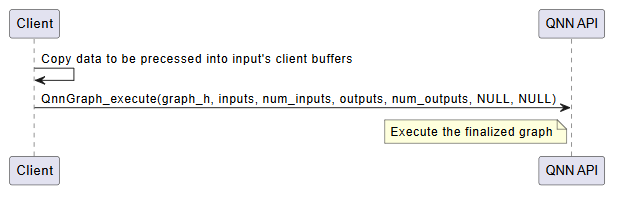
The execution phase is responsible for running inference using the finalized QNN graph. This phase is typically repeated for each inference request and involves the following steps:
Input Buffer Preparation
Populate the input tensors with data from the client application.
Ensure that the data format, dimensions, and layout match the model’s input specification.
Input tensors must be bound to client-allocated buffers, typically of type
QNN_TENSORTYPE_RAW.
Graph Execution
Invoke the model using
QnnGraph_execute().This function triggers the execution of the graph on the target hardware (e.g., eNPU).
The execution is synchronous; the function returns only after inference is complete.
Execution Flow:
Input data is transferred to the backend.
The backend schedules and executes the graph operations.
Intermediate results are computed and stored in backend-managed memory.
Final outputs are written to the output buffers.
Output Retrieval
After execution, output tensors contain the inference results.
These results are available in the client-provided output buffers.
The application can now post-process or consume the output data as needed.
Optional: Profiling and Logging
If profiling is enabled (via –profiling_level), performance data is collected during execution.
Profiling logs are written to the output directory and can be visualized using qnn-profile-viewer.
Error Handling
Check the return status of
QnnGraph_execute().Handle any runtime errors, such as invalid inputs, memory access violations, or hardware faults.
Important
Input and output buffers must remain valid and accessible throughout the execution.
Ensure that memory alignment and size requirements are met to avoid execution failures.
LPAI Execution Call Flow
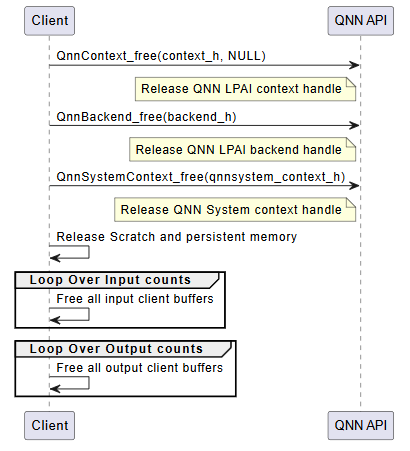
Deinitialization
The deinitialization phase is responsible for releasing all resources allocated during the initialization and execution phases. Proper deinitialization ensures that memory is freed, handles are closed, and the system is left in a clean state. This is especially important in embedded or resource-constrained environments.
The following steps outline the deinitialization process:
Release QNN Context Handle
Call
QnnContext_free()to release the context created viaQnnContext_createFromBinary().This step invalidates the context and all associated graph handles.
Release LPAI Backend Handle
Call
QnnBackend_free()to release the backend handle created during initialization.This step ensures that backend-specific resources (e.g., device memory, threads) are properly cleaned up.
Release QNN System Context Handle
Call
QnnSystemContext_free()to release the system context.This step finalizes the system-level interface and releases any associated metadata or configuration.
Free Scratch and Persistent Memory
If memory was allocated manually for scratch and persistent buffers (e.g., on Hexagon aDSP), it must be explicitly freed.
These buffers are typically allocated based on properties queried via
QnnGraph_getProperty().
Free Input and Output Tensors
Release memory associated with input and output tensors.
This includes: - Client-allocated buffers bound to tensors - Any metadata or auxiliary structures used for tensor management
Optional: Logging and Diagnostics Cleanup
If profiling or logging was enabled, ensure that any open file handles or logging streams are closed.
Optionally, flush logs or export profiling data before shutdown.
Important
All deinitialization steps must be performed in the reverse order of initialization to avoid resource leaks or undefined behavior.
Failure to properly deinitialize may result in memory leaks, dangling pointers, or device instability.
LPAI Deinitialization Call Flow